What Claude Code is (and why it’s not just a chat)
Claude Code is Anthropic’s AI coding agent that works inside your project: it reads files, runs terminal commands, writes and fixes code and makes commits. Unlike a browser chat, there’s no copy-pasting — the agent finds the right files, makes the change and verifies it, for example by running your tests.
You can use it in the terminal, the Claude desktop app, VS Code, JetBrains IDEs and on the web. This guide covers the terminal version — it’s the most flexible, and everything here applies to the other surfaces too.
- It acts, not just advises. So the most important part of setup is rules: what it may do freely, what needs confirmation and what’s off-limits.
- Context is the scarce resource. The clearer your project description and requests, the better the results and the lower your usage.
- You can teach it your project with CLAUDE.md, skills, hooks and subagents. That’s what separates casual users from power users.
Requirements: account and system
Account. The free Claude.ai plan doesn’t include Claude Code. You need a paid plan (Pro, Max, Team or Enterprise) or a Console account with pay-as-you-go API billing. Amazon Bedrock, Google Cloud and Microsoft Foundry are also supported for companies with existing cloud agreements.
Which to choose: if you code daily, a subscription is cheaper and more predictable. The API suits automations and occasional use — you pay only for what you consume.
| OS | Minimum version |
|---|---|
| macOS | 13.0+ |
| Windows | 10 (1809)+ or Windows Server 2019+ |
| Linux | Ubuntu 20.04+, Debian 10+, Alpine 3.19+ |
Plus 4 GB+ RAM and an x64 or ARM64 CPU. Git is optional but strongly recommended — it’s your undo button.
Install on macOS and Linux
The recommended way is the native installer, which also auto-updates in the background:
curl -fsSL https://claude.ai/install.sh | bashVerify the install:
claude --version
claude doctor
claude doctor is read-only: it checks your installation, paths and settings and tells you what to fix.
# Homebrew (macOS) — stable channel, updated manually
brew install --cask claude-code
brew upgrade claude-code

# npm — requires Node.js 22+, never with sudo
npm install -g @anthropic-ai/claude-code@latestsudo. It causes permission problems on every update. If npm asks for sudo, use the native installer instead.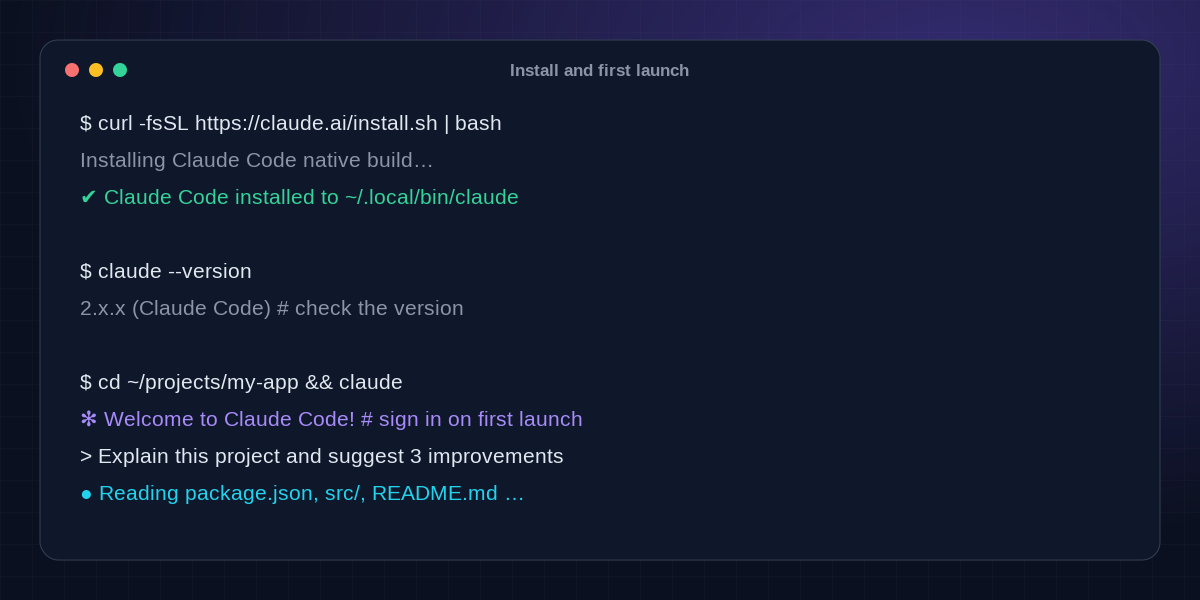
Install on Windows: native or WSL
Option 1: native (simplest)
irm https://claude.ai/install.ps1 | iexOr with WinGet:
winget install Anthropic.ClaudeCodeTip: install Git for Windows. Claude Code will then run commands in Git Bash — most scripts and docs online assume bash. Without it, Claude Code uses PowerShell. If Git Bash isn’t detected, point to it in settings:
{ "env": { "CLAUDE_CODE_GIT_BASH_PATH": "C:\\Program Files\\Git\\bin\\bash.exe" } }Option 2: WSL (if you develop for Linux)
If your project lives in WSL, install Claude Code inside WSL with the Linux command. Bonus: sandboxing, which isolates the agent’s commands, is supported on WSL 2 but not on native Windows.
First launch and sign-in
cd ~/projects/my-app
claude
On first run you’ll be asked to sign in with your Claude plan or a Console account. Switch accounts anytime with /login and /logout.
Start with safe, read-only requests:
> Explain how this project works: stack, structure, how to run it
> Find where authentication is handled and describe the data flow
> Which 3 parts of the code would you improve first, and why?| Command | What it does |
|---|---|
claude "task" | start with an initial prompt |
claude -p "query" | one-off answer, non-interactive — great in scripts |
claude -c | continue the latest conversation in this folder |
claude -r | pick and resume an older session |
claude update | update manually |
CLAUDE.md: the most important file
CLAUDE.md is the instruction file Claude reads at the start of every session: what the project is, how to run it, code conventions and what not to do. A good one saves dozens of back-and-forth messages and noticeably improves output quality.
Fastest start: run /init. Claude studies the repo and drafts a CLAUDE.md (it won’t overwrite an existing one). Then refine it by hand using the template from the starter kit.
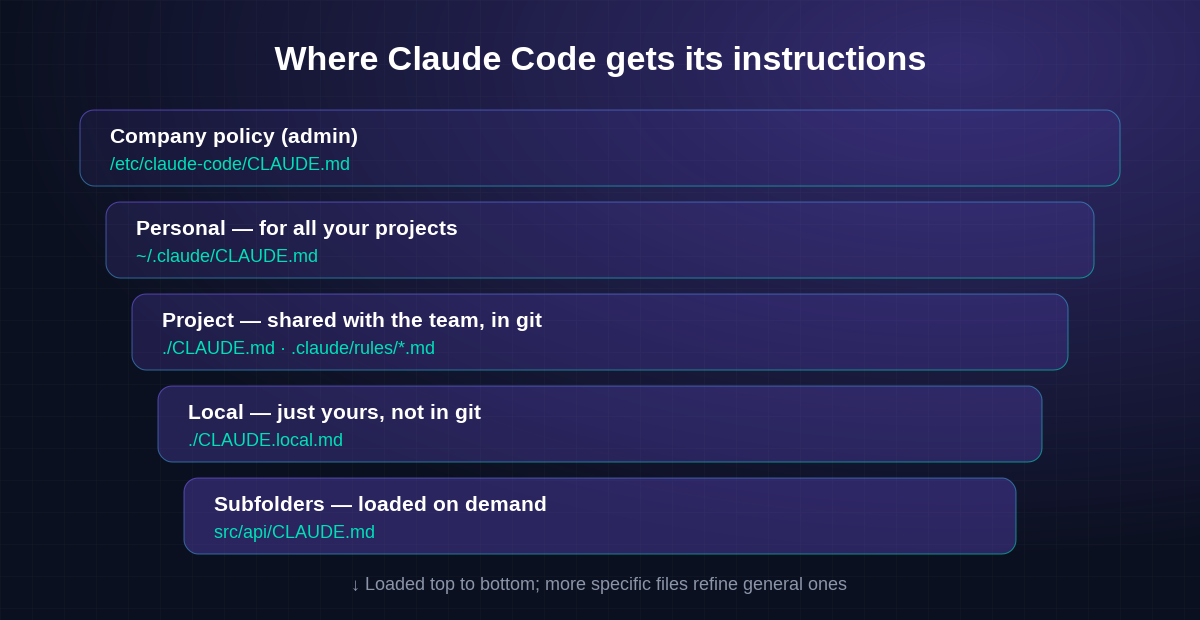
| File | Purpose |
|---|---|
~/.claude/CLAUDE.md | your personal rules for every project |
./CLAUDE.md or ./.claude/CLAUDE.md | project rules — commit them so the whole team shares them |
./CLAUDE.local.md | your private notes for this project — add to .gitignore |
.claude/rules/*.md | topic rules; can be scoped to paths such as src/api/** |
What to put in CLAUDE.md:
- What the project is — 2–3 sentences and the stack.
- Commands — install, dev, tests (including how to run a single test), lint, build. The single most useful section.
- Project map — key folders and what lives there.
- Conventions — anything not obvious from the code itself.
- Don’ts — generated files, new dependencies without asking, migrations only through…
@docs/architecture.md, or turn workflows into skills that load only when needed.Two more useful facts: if your repo already has an AGENTS.md, Claude Code reads it when no CLAUDE.md exists. And you can save a note on the fly by saying “remember that…” — it goes into auto memory.
Permissions: what the agent may do without asking
By default Claude Code asks before editing files and running commands. Safe, but tiring. Fix it with rules in .claude/settings.json:
{
  "$schema": "https://json.schemastore.org/claude-code-settings.json",
  "permissions": {
    "allow": ["Bash(npm run lint)", "Bash(npm run test *)", "Bash(git diff *)"],
    "ask":   ["Bash(git push *)", "Bash(npm install *)"],
    "deny":  ["Read(./.env)", "Read(./.env.*)", "Read(./secrets/**)"]
  }
}- allow — runs without prompting (tests, lint, read-only git).
- ask — always confirm (push, installing packages).
- deny — blocked (reading secrets).
| File | Scope |
|---|---|
~/.claude/settings.json | all your projects |
.claude/settings.json | whole team (in git) |
.claude/settings.local.json | just you, this project |
Manage rules interactively with /permissions, and cycle permission modes with Shift+Tab — including plan mode, where the agent researches and proposes a plan without changing anything.
.env and key folders. Secrets can leak into logs, commits or replies by accident.Hooks: guardrails that always run
Hooks are your scripts that Claude Code runs at specific moments: before a tool runs (PreToolUse), after it (PostToolUse), at session start and more. Unlike CLAUDE.md instructions, hooks run every time, not “if the model remembers”.
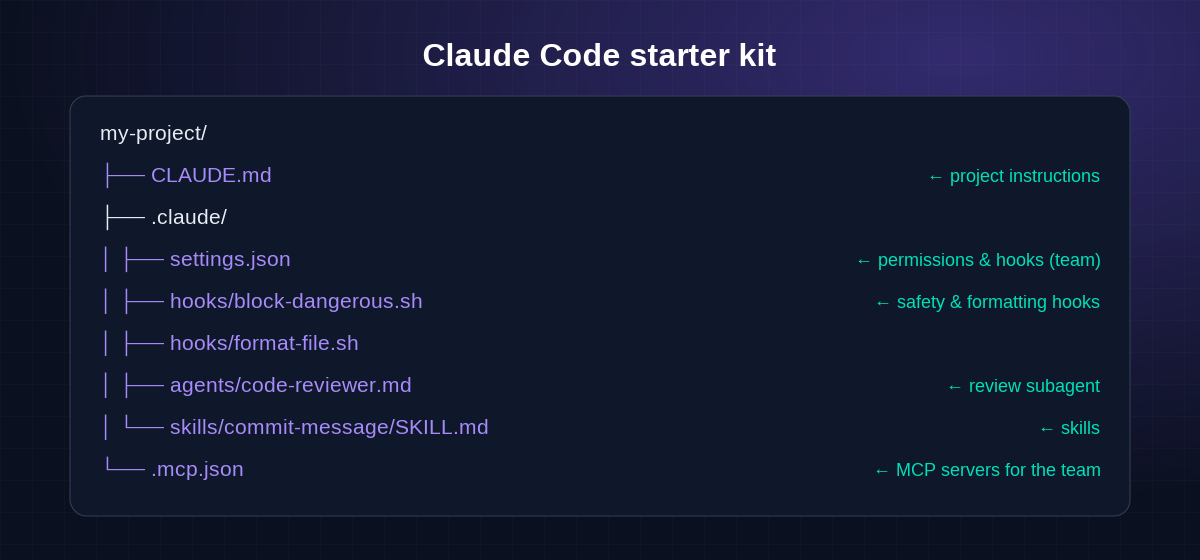
- block-dangerous.sh blocks destructive commands —
rm -rf /,git push --force,git reset --hard,DROP TABLE,curl | bash. It receives the tool call as JSON and exits with code 2 when a command is dangerous: Claude Code cancels the action and tells the agent why. - format-file.sh formats every edited file with Prettier (JS/TS/CSS/JSON) or Black (Python) when available.
{
  "hooks": {
    "PreToolUse": [
      { "matcher": "Bash",
        "hooks": [{ "type": "command", "command": "${CLAUDE_PROJECT_DIR}/.claude/hooks/block-dangerous.sh" }] }
    ],
    "PostToolUse": [
      { "matcher": "Edit|Write",
        "hooks": [{ "type": "command", "command": "${CLAUDE_PROJECT_DIR}/.claude/hooks/format-file.sh" }] }
    ]
  }
}
On macOS/Linux, make the scripts executable after copying: chmod +x .claude/hooks/*.sh. The scripts need jq (or Python) to read JSON. On native Windows without Git Bash, use the PowerShell version block-dangerous.ps1 from the kit. List active hooks with /hooks.
10 ready-made hooks — Telegram alerts, tests before stopping, secret-leak guard — in Claude Code hooks: 10 recipes.
MCP: connect external tools
MCP (Model Context Protocol) lets the agent work with external systems — Notion, GitHub, databases, Figma, your CRM.
# remote server (recommended)
claude mcp add --transport http notion https://mcp.notion.com/mcp

# local server via npx
claude mcp add --env AIRTABLE_API_KEY=your_key airtable -- npx -y airtable-mcp-server

# list and remove
claude mcp list
claude mcp remove notion
The -s flag sets the scope: local (default — you, this project), project (a .mcp.json file in the repo root for the team) or user (all your projects). .mcp.json supports environment variables so keys stay out of git.
/mcp. If a service has a CLI (gh, aws), it’s often cheaper than MCP.12 useful servers with copy-paste commands: Claude Code MCP guide.
Skills and subagents: the next level
Skills are folders with a SKILL.md that Claude loads only when a task matches — for example, the kit’s commit-message skill writes commit messages your way. Full walkthrough and 10 more skills: Claude Code skills guide.
Subagents are specialised helpers with their own role, model and tools. They work in a separate context and return only the result. The kit includes code-reviewer — just ask “review my changes with the code-reviewer subagent”.
How to build your own subagents, plus 8 ready-made ones: Claude Code subagents.
Save usage: 9 habits
/clearbetween unrelated tasks. You can always get back with/resume./compactwith a focus in long tasks:/compact keep the API decisions and failing tests.- Short CLAUDE.md — under 200 lines; the rest goes into skills.
- Right model for the job. Sonnet for everyday work, Opus for hard architecture and gnarly bugs. Switch with
/model. - Fewer MCP servers.
- Noisy work goes to subagents — test runs and log digging stay out of your main context.
- Plan before big changes (
Shift+Tab). Fixing a plan is cheaper than fixing code. - Specific prompts: “in
src/api/users.ts,getUserreturns 500 on an empty id — find the cause and add a test” beats “fix the API”. - Watch usage with
/usage(formerly/cost) and see what fills your context with/context.
Troubleshooting
| Problem | Fix |
|---|---|
claude: command not found | Open a new terminal; make sure ~/.local/bin is on your PATH; run claude doctor. |
| Permission errors with npm | Don’t use sudo. Uninstall the npm version and use the native installer. |
| “Settings Error” on start | JSON doesn’t allow comments or trailing commas. claude doctor shows the offending entry. |
| Hook doesn’t fire | Check /hooks, executable bit (chmod +x) and that jq is installed. |
MCP server from .mcp.json missing | Project servers need approval — they show as “Pending approval” in claude mcp list. |
| The agent “forgets” rules | Shorten CLAUDE.md; move critical bans into deny rules or hooks, which always apply. |
Next steps
Download the starter kit, unzip it into your repo root, adapt CLAUDE.md — and you have a configured, safe agent that follows your team’s rules. Next: write your own skills.
FAQ
Is Claude Code free?
No. The free Claude.ai plan does not include Claude Code. You need a Pro, Max, Team or Enterprise plan, or a Console account with pay-as-you-go API billing.
How do I install Claude Code on Windows?
Run irm https://claude.ai/install.ps1 | iex in PowerShell or winget install Anthropic.ClaudeCode. Installing Git for Windows is recommended. WSL also works.
What is CLAUDE.md?
An instruction file for the agent: project overview, commands, conventions and rules. Claude reads it at the start of every session. Generate a draft with /init.
How do I update Claude Code?
The native install auto-updates. Manually: claude update; Homebrew: brew upgrade claude-code; WinGet: winget upgrade Anthropic.ClaudeCode.
Is it safe to give the agent access to my repo?
Yes, with the right setup: allow safe commands, require confirmation for pushes and installs, deny reading .env, and add guardrail hooks like the ones in the starter kit.
Let’s talk about your project
Describe the task in a couple of sentences — I reply within one business day. Free and no obligation.
Telegram Discuss a project