What MCP is, in plain English
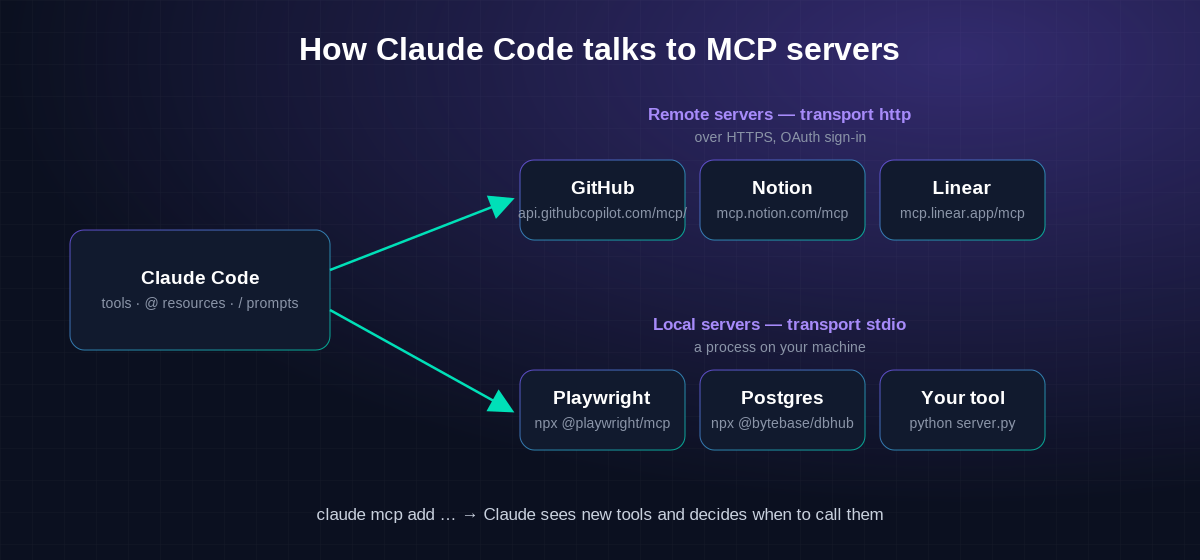
Out of the box, Claude Code works with files and the terminal. But your work lives elsewhere too: issues in Linear or Jira, docs in Notion, errors in Sentry, data in a database. MCP is the open standard the agent uses to plug into those systems.
- Tools — actions Claude can call: “create issue”, “find error”, “run SQL”.
- Resources — data you can reference with
@, e.g.@github:issue://123. - Prompts — server-provided commands that appear in the
/menu.
| Type | How it works | Use for |
|---|---|---|
| Remote (http) | hosted by the vendor, OAuth sign-in in the browser | GitHub, Notion, Linear, Sentry — anything cloud. Recommended |
| Local (stdio) | a program on your machine, usually via npx | browser automation (Playwright), local DBs, your own scripts |
SSE transport is deprecated. Claude Code falls back to it automatically when a server requires it, but use http for new connections.
Connect a server: three commands
# remote server
claude mcp add --transport http notion https://mcp.notion.com/mcp

# local server (everything after -- is the launch command)
claude mcp add playwright npx @playwright/mcp@latest

# with an auth header
claude mcp add --transport http github https://api.githubcopilot.com/mcp/ \
  --header "Authorization: Bearer YOUR_GITHUB_PAT"
Then start claude and type /mcp to see every server’s status and complete OAuth sign-in in the browser. From the shell: claude mcp login notion.
claude mcp list            # all servers and status
claude mcp get notion      # details
claude mcp remove notion   # remove
claude mcp logout notion   # sign out of the service
Scopes: local, project, user
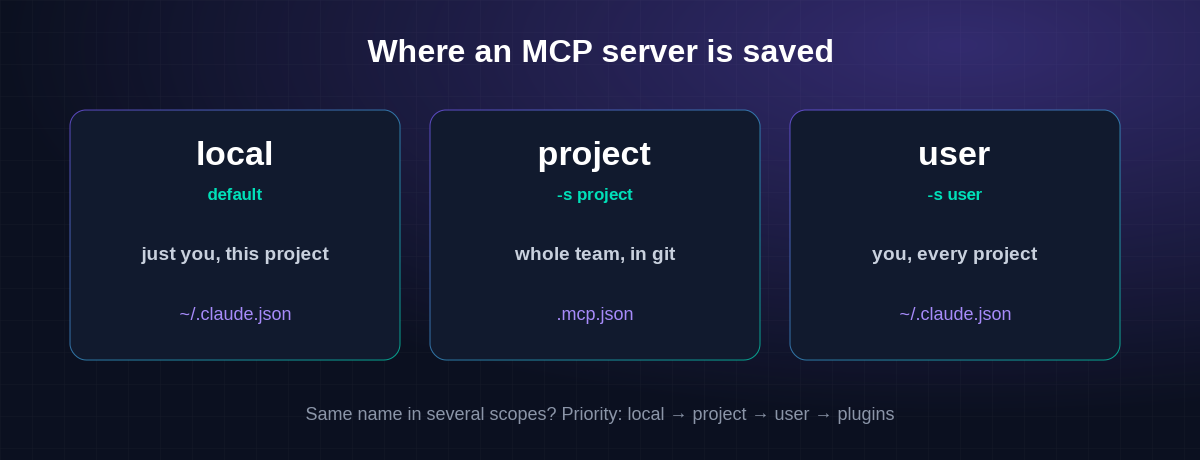
By default a server is added for you, in the current project only. To give the whole team the same setup, use -s project — it’s written to .mcp.json in the repo root:
{
  "mcpServers": {
    "linear": { "type": "http", "url": "https://mcp.linear.app/mcp" },
    "github": {
      "type": "http",
      "url": "https://api.githubcopilot.com/mcp/",
      "headers": { "Authorization": "Bearer ${GITHUB_PAT}" }
    },
    "playwright": { "command": "npx", "args": ["@playwright/mcp@latest"] }
  }
}
Note ${GITHUB_PAT}: secrets stay out of git, and everyone supplies their own via environment variables. Defaults work too: ${API_URL:-https://api.example.com}.
.mcp.json don’t run until you approve them — Claude Code asks on first use. Only install servers from official sources; an MCP server gets access to data and actions like any app would.12 useful MCP servers with commands
Endpoints checked against Anthropic’s and the vendors’ documentation as of November 2026. Still, double-check the vendor’s docs before connecting — URLs do change.
Engineering
| Service | What you get | Command |
|---|---|---|
| GitHub | issues, PRs, reviews, code search | claude mcp add --transport http github https://api.githubcopilot.com/mcp/ |
| Sentry | production errors with stack traces | claude mcp add --transport http sentry https://mcp.sentry.dev/mcp |
| Vercel | deployments, logs, projects | claude mcp add --transport http vercel https://mcp.vercel.com |
| Supabase | tables, SQL, migrations | claude mcp add --transport http supabase "https://mcp.supabase.com/mcp?read_only=true" |
| PostgreSQL (DBHub) | query your database | claude mcp add --transport stdio db -- npx -y @bytebase/dbhub --dsn "postgresql://readonly:pass@host:5432/db" |
| Playwright | browser automation: open, click, verify | claude mcp add playwright npx @playwright/mcp@latest |
| Context7 | up-to-date library docs | claude mcp add --transport http context7 https://mcp.context7.com/mcp --header "Authorization: Bearer KEY" |
Work management, docs, design
| Service | What you get | Command |
|---|---|---|
| Linear | issues, projects, statuses | claude mcp add --transport http linear https://mcp.linear.app/mcp |
| Notion | pages and knowledge bases | claude mcp add --transport http notion https://mcp.notion.com/mcp |
| Figma | designs and tokens for implementation | claude mcp add --transport http figma https://mcp.figma.com/mcp |
Business
| Service | What you get | Command |
|---|---|---|
| Stripe | payments, customers, subscriptions | claude mcp add --transport http stripe https://mcp.stripe.com |
| HubSpot | CRM contacts and deals | claude mcp add --transport http hubspot --scope user https://mcp.hubspot.com/anthropic |
readonly above) and use flags such as Supabase’s read_only=true. It’s the best insurance against an accidental DELETE.Example prompts
> Take Linear issue ENG-421, implement it and open a GitHub pull request
> Check the latest Sentry errors for the checkout service and find the root cause in our code
> How many users signed up last week? (DB, read-only)
> Open staging.example.com/login in Playwright and verify the form shows an error for an empty password
> Build this component from the Figma frame: ...
You can also reference resources directly — @github:issue://123 — or run server prompts from the / menu (shown as /server:prompt).
Keep your context lean
- Tool search (on by default) loads MCP tool definitions on demand instead of all at once.
- Disable what you don’t need via
/mcp— Figma only when you’re building UI. - Output limits. Tool output is capped at 25,000 tokens by default (
MAX_MCP_OUTPUT_TOKENSchanges it), but it’s better to ask the server for less with filters and limits. - Prefer CLIs where they exist. If a service has a CLI (
gh,vercel,stripe), the agent can use it via the terminal — often cheaper than MCP.
Troubleshooting
| Problem | Fix |
|---|---|
| Server shows “needs authentication” | Run /mcp and sign in, or claude mcp login name. |
Server from .mcp.json isn’t working | It’s awaiting your approval. Reset earlier choices with claude mcp reset-project-choices. |
| Local server won’t start | Make sure the command after -- runs on its own in a terminal (Node.js is required for npx). |
| “url without type” error | Remote entries in .mcp.json need "type": "http". |
| Slow tools | Calls over 2 minutes move to a background task; tune MCP_TIMEOUT and MCP_TOOL_TIMEOUT. |
Wrap-up
Start with the 2–3 servers you use daily — typically your issue tracker, GitHub and Sentry. Share them via .mcp.json, keep keys in environment variables and databases read-only. See also the setup guide and Claude Code hooks.
FAQ
What is MCP in Claude Code?
Model Context Protocol is an open standard for connecting external services to AI agents. An MCP server gives Claude Code the tools, resources and prompts of a service such as GitHub, Notion, Sentry or a database.
How do I add an MCP server?
Run claude mcp add --transport http name URL for a remote server or claude mcp add name command for a local one, then use /mcp to sign in with OAuth.
Where is MCP configuration stored?
By default in ~/.claude.json for the current project only. With -s project it goes into .mcp.json in the repo root (shared with the team); with -s user it applies to all your projects.
Is it safe to connect MCP to a database?
Yes, with a read-only database user and servers from official sources. Project servers from .mcp.json don’t run until you approve them.
Let’s talk about your project
Describe the task in a couple of sentences — I reply within one business day. Free and no obligation.
Telegram Discuss a project