What skills are and why they matter
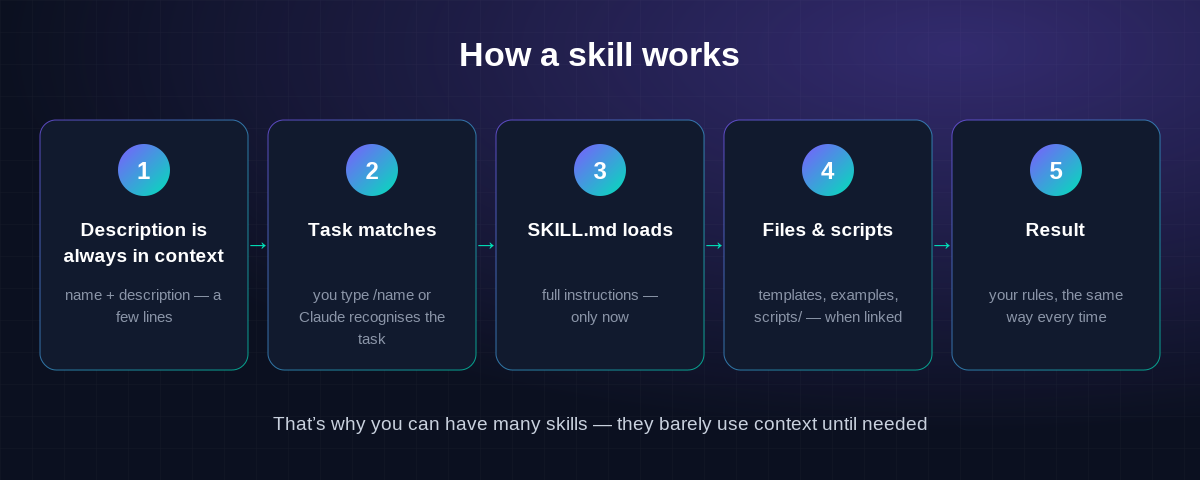
Imagine explaining to every new teammate how to write commits, how tests are structured and what to check before a release. A skill is that explanation, written once. Claude Code applies it automatically when a task matches, or when you type /skill-name.
- They barely use context. Only the name and description load each session; the body loads on demand.
- Repeatable results — the same process for you and your whole team.
- They can bundle files: templates, examples, Python or bash scripts.
- They double as commands. Custom commands in
.claude/commands/have been merged into skills (old files still work, but new ones should be skills).
Where skills live
| Scope | Path | Who gets it |
|---|---|---|
| Personal | ~/.claude/skills/<name>/SKILL.md | you, in every project |
| Project | .claude/skills/<name>/SKILL.md | the whole team (commit it) |
| Nested | <dir>/.claude/skills/<name>/SKILL.md | part of a monorepo |
| Plugin | <plugin>/skills/<name>/SKILL.md | invoked as /plugin:skill |
The folder name becomes the command. List skills with /skills. Edits are picked up live; if a new skill doesn’t show up, run /reload-skills.
SKILL.md anatomy
| Field | What it does |
|---|---|
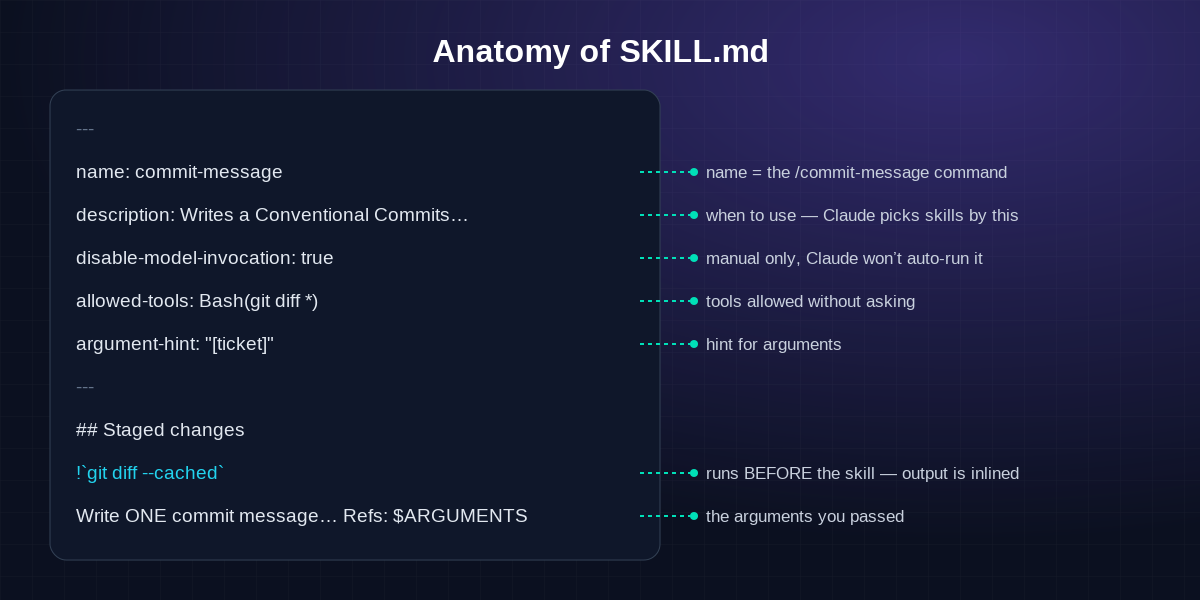
name | skill name and command (defaults to the folder name) |
description | the most important field — Claude decides whether to use the skill based on it. Say what it does and when to use it |
disable-model-invocation: true | manual only — for actions with consequences (commit, deploy) |
user-invocable: false | the opposite: hidden from the menu, only Claude uses it |
allowed-tools | tools the skill may use without asking, e.g. Bash(git diff *) |
argument-hint | argument hint shown in the command menu |
model, effort | model and reasoning effort for this skill |
context: fork | run in a separate subagent so the main conversation stays clean |
paths | activate only for files matching glob patterns |
Build your first skill in 5 minutes
Let’s build a skill that writes a Conventional Commits message from your staged changes.
Step 1. Create the folder:
mkdir -p .claude/skills/commit-messageStep 2. Create .claude/skills/commit-message/SKILL.md:
---
name: commit-message
description: Writes a clear Conventional Commits message for the currently staged changes. Use when the user asks to commit or to write a commit message.
disable-model-invocation: true
allowed-tools: Bash(git diff *) Bash(git status *) Bash(git commit *)
argument-hint: "[ticket number]"
---

## Staged changes
!`git diff --cached --stat`

!`git diff --cached`

## Task
Write ONE commit message for the staged changes above:
<type>(<scope>): <summary, imperative mood, max 72 chars>
Then a short body explaining WHY. Footer: Refs: $ARGUMENTS
Show the message and ask before running git commit.
Step 3. Stage your changes and run it:
> /commit-message JIRA-142!`git diff --cached`is dynamic context: the command runs before Claude sees the skill and its output is inlined — no wasted tool calls.$ARGUMENTSis everything you typed after the command; individual arguments are$0,$1and so on.disable-model-invocation: truemeans Claude never commits on its own initiative.
Writing descriptions that trigger reliably
| Weak | Strong |
|---|---|
| Helps with tests | Writes or extends automated tests for a given file or recent change, following the project's existing test framework. Use when the user asks for tests or test coverage. |
| SEO stuff | Writes SEO titles, meta descriptions, Open Graph tags and JSON-LD for web pages. Use when creating or optimizing pages for Google, Bing or AI search. |
Formula: what it does + on what input + “Use when…” with the phrases users actually say.
Advanced techniques
Supporting files
.claude/skills/api-docs/
├── SKILL.md
├── template.md        # documentation template
├── examples.md        # a great example output
└── scripts/
    └── extract_routes.py
Link these from SKILL.md and Claude reads them only when it reaches that step. Keep SKILL.md itself lean (under ~500 lines). Reference the skill folder with ${CLAUDE_SKILL_DIR}.
Run in a forked subagent
Add context: fork for heavy research tasks: the skill runs in an isolated context and returns only the summary. The pack’s explain-codebase skill works this way — it reads the whole repo, but only the onboarding map lands in your conversation.
Scope to part of a repo
A paths field with globs like "src/api/**" activates the skill only when working on matching files — handy in large monorepos.
The 10 skills in the pack
| Skill | What it does |
|---|---|
commit-message | Conventional Commits message from staged changes |
write-tests | tests in your project’s style: happy paths, edge cases, error paths |
explain-codebase | onboarding map of the repo (runs in a forked subagent) |
changelog | human-friendly release notes from git history |
security-check | checks changes for secrets, injection, XSS, SSRF and access-control gaps |
seo-meta | titles, meta descriptions, Open Graph and JSON-LD |
landing-copy | landing page copy from a brief — no invented testimonials or stats |
translate-i18n | translates locale files, preserving keys and placeholders |
bug-hunt | root-cause debugging: reproduce → hypotheses → verify → fix → regression test |
api-docs | API docs from code: params, responses, errors, curl examples |
Install: unzip and copy the folders you want into ~/.claude/skills/ (all projects) or your project’s .claude/skills/. Names deliberately avoid clashing with built-in commands such as /code-review and /debug.
Common mistakes
- Vague descriptions — the skill fires in the wrong places. Add concrete “Use when…” phrases.
- A giant SKILL.md — move reference material into separate files.
- Risky actions without
disable-model-invocation— deploys and commits should be user-triggered. - Broken YAML frontmatter — e.g. an unquoted colon in the description. Unknown fields are silently ignored, so double-check spelling.
- Duplicating CLAUDE.md — keep project-wide rules in CLAUDE.md and specific workflows in skills.
Wrap-up
Start with 2–3 skills for things you do every week: commits, tests, releases. A month later you’ll have a library of processes that run the same way for everyone. For the basics, see the Claude Code setup guide.
FAQ
What’s the difference between a skill and CLAUDE.md?
CLAUDE.md loads fully into every session and suits project-wide rules. A skill loads only when needed and describes one specific workflow.
Where should I put skills?
Personal skills go in ~/.claude/skills/, project skills in .claude/skills/ inside the repo. Each skill is a folder containing SKILL.md.
How do I invoke a skill?
Type /skill-name, or just describe the task — Claude picks the right skill based on its description. Use disable-model-invocation: true to require manual invocation.
Do old .claude/commands files still work?
Yes. Commands and skills have been merged; existing command files keep working, but new instructions are best written as skills.
Let’s talk about your project
Describe the task in a couple of sentences — I reply within one business day. Free and no obligation.
Telegram Discuss a project