What it is and how it differs from a regular chatbot
A regular chatbot follows pre-written scripts or answers "from memory" of the language model — which is why it sometimes makes things up with confidence. An AI knowledge base works differently: before answering, the system finds the relevant passages in your documents and builds the answer only from them. This approach is called RAG (Retrieval-Augmented Generation). I explain it in plain words in "RAG explained simply".
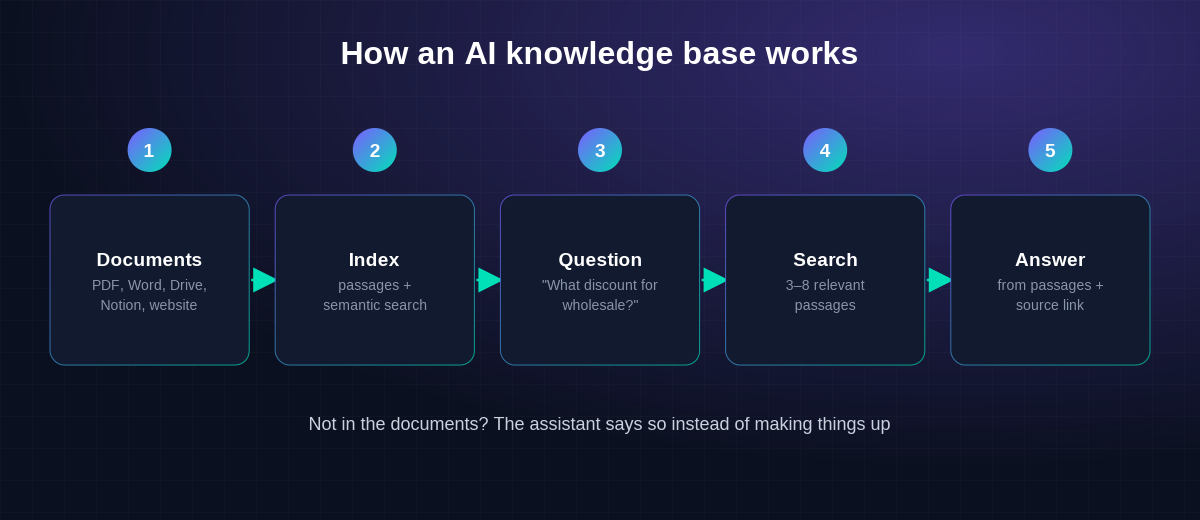
The key difference for a business is that every answer can be checked. Each answer links to the document and section it came from. If the documents don't contain the answer, the assistant says so — "this isn't in the knowledge base, please ask your manager" — instead of inventing one.
Who needs it and why
- Sales teams. A rep finds payment terms, product specs or the answer to a common objection in seconds — without interrupting senior colleagues.
- Customer support. An assistant on your website or in Telegram answers from manuals and FAQs around the clock and hands complex questions to a human along with the conversation history.
- Onboarding. Instead of "go ask Olga", new hires get an assistant that knows your procedures, job descriptions and internal rules.
- Field service and manufacturing. A technician on site asks about tolerances, wiring diagrams or work procedures and gets an answer from the technical documentation.
- Legal and accounting. Search across contracts, templates and internal policies: "what are the payment terms in the contract with N?", "where is the invoice template?".
Sources you can connect
| Source | Examples | How it updates |
|---|---|---|
| Documents | PDF, Word, Excel, presentations | upload to a folder or on demand |
| Cloud storage | Google Drive, OneDrive, Dropbox | automatically, on a schedule |
| Wikis and notes | Notion, Confluence, Google Docs | automatically |
| Website and catalog | site pages, product pages, FAQ | on a schedule or on change |
| CRM and ERP | statuses, stock, prices (via API) | live, at question time |
Scans and photos of documents work too: the text is recognized before indexing. Price and stock tables are best connected directly to your accounting system so the assistant always sees current data, not yesterday's file.
Where the assistant works
- Telegram bot for your team — the fastest start, nothing to install.
- Website widget for customers — answers about the catalog, shipping and warranty.
- Internal portal or an integration into your CRM.
- Slack, Microsoft Teams, WhatsApp — on request.
Security and access control
Company documents are sensitive, so from day one I set up:
- Role-based access. A sales rep only gets answers from sales documents, accounting from accounting documents. Payroll data never shows up in an answer to the sales team.
- Choice of model and hosting. GPT or Claude via API (providers don't train models on API data), or a model running on your own server for highly confidential data.
- Question and answer log. You see what people ask and where the knowledge base falls short — a clear hint about which documents to write or update.
- Your data stays yours. The index, settings and code are handed over to you. No lock-in to a chatbot builder subscription.
How the project runs
- Document audit (1–3 days). I review what documents you have, their condition and which questions the assistant should answer. Together we list 30–50 real questions from staff or customers — we use them later to check quality.
- Prototype (3–7 days). I connect part of the documents and demo the assistant on your questions. This is usually where contradictions and outdated documents surface.
- Quality tuning. How documents are split into passages, semantic search plus exact-match search (SKUs, contract numbers), answer rules and tone.
- Integration and launch. Telegram, website or CRM, access rules, automatic knowledge base updates.
- Support. Once a month we review the log: which questions went unanswered and what to add to the documents.
Pricing
| Package | What's included | Price | Timeline |
|---|---|---|---|
| Starter | up to 200 documents, one channel (Telegram or website), source links | from $700 | 1–2 weeks |
| Business | cloud storage with auto-sync, roles and permissions, log, 2–3 channels | from $1,500 | 2–3 weeks |
| Company | CRM and ERP integration, self-hosted model, complex permissions | from $3,000 | 3–6 weeks |
Monthly running costs are the AI model and hosting. For a small team (a few hundred questions a month) that's usually $10–50. I'll give a precise estimate after the document audit.
If you need the AI not only to answer but to act — create a task, send an email, update a CRM record — that's an AI agent. For a customer-facing bot with booking and ordering flows, see AI chatbots.
FAQ
How much does an AI knowledge base cost?
The starter version for up to 200 documents and one channel starts at $700. With cloud auto-sync, roles and several channels it starts at $1,500. Monthly model and hosting costs for a small team are usually $10–50.
Will the AI make things up?
The assistant answers only from the passages it finds in your documents and shows the source. If the information isn't there, it says so. The risk of mistakes isn't zero, so we test quality on 30–50 real questions before launch.
Will OpenAI or Anthropic train on our documents?
When used via API, providers don't use your data to train their models. For highly confidential data, the model can run on your own server.
Can access to documents be restricted?
Yes. Roles are configured so each employee only gets answers from documents they are allowed to see.
What if our documents are outdated?
That's common. The prototype stage reveals contradictions and gaps right away, so you know what to update first.
Let’s talk about your project
Describe the task in a couple of sentences — I reply within one business day. Free and no obligation.
Telegram Discuss a project