Chatbot vs. automation vs. agent
| Chatbot | Automation (n8n, Zapier) | AI agent | |
|---|---|---|---|
| What it does | answers questions | runs a predefined sequence | chooses steps to reach a goal |
| Flexibility | within its knowledge base | fixed workflow | handles unusual cases |
| Error risk | low | low, predictable | higher — needs guardrails |
| Example | “How much is shipping?” | lead → CRM → Slack | “triage the inbox and draft replies” |
The best real-world setups are hybrids: fixed automation for predictable steps, an agent where text understanding and rule-bound judgment are needed.
Six tasks where agents already pay off
- Inbox triage. Reads emails and messages, figures out what the customer needs, pulls CRM data and drafts a reply or a task for a human to approve.
- Lead qualification. Researches the prospect’s website, fills the CRM record (industry, size, need) and sets a priority.
- Tier-2 support. Searches docs, past tickets and the knowledge base and suggests a solution with sources.
- Documents. Matches invoices to orders, flags contract discrepancies, drafts proposals from templates.
- On-demand analytics. “Why did sales drop in region X?” — gathers data from sheets and the CRM and writes a short analysis.
- Content and SEO. Collects facts, drafts articles and product descriptions, checks meta tags — with a final human edit.
Risks and how to handle them
- Errors and hallucinations. Ground the agent in your data; sensitive actions (payments, customer-facing sends, deletions) need human approval.
- Overly broad access. Grant the minimum: read the CRM, create drafts — not delete or mass-send.
- Prompt injection. Incoming emails and web pages can contain “instructions”. External text is data, not commands; critical actions come only from an allow-list.
- Data. Business APIs that don’t train on your data, and a log of every action.
- Cost. Daily caps on steps and tokens.
Pricing
| Option | Includes | Price | Timeline |
|---|---|---|---|
| Assistant agent | one task (e.g. inbox triage), drafts for approval | $800–1,500 | 1–3 weeks |
| Integrated agent | CRM, email, sheets, knowledge base, action log | $2,000–4,000 | 3–6 weeks |
| Team of agents | several tasks, roles and permissions, analytics | from $5,000 | from 6 weeks |
Monthly model usage typically runs $20–200 depending on volume, plus hosting. Simple flows without judgment calls are cheaper as plain n8n automation.
How to start
- Pick one task where people spend hours on repetitive text work.
- Define what a good result looks like and which actions are off-limits.
- Run it in draft mode for 2–4 weeks and compare with human output.
- Expand permissions only where the agent is consistently reliable.
Need a customer-facing agent? Start with an AI assistant or a ready-made industry scenario.
FAQ
How is an AI agent different from a chatbot?
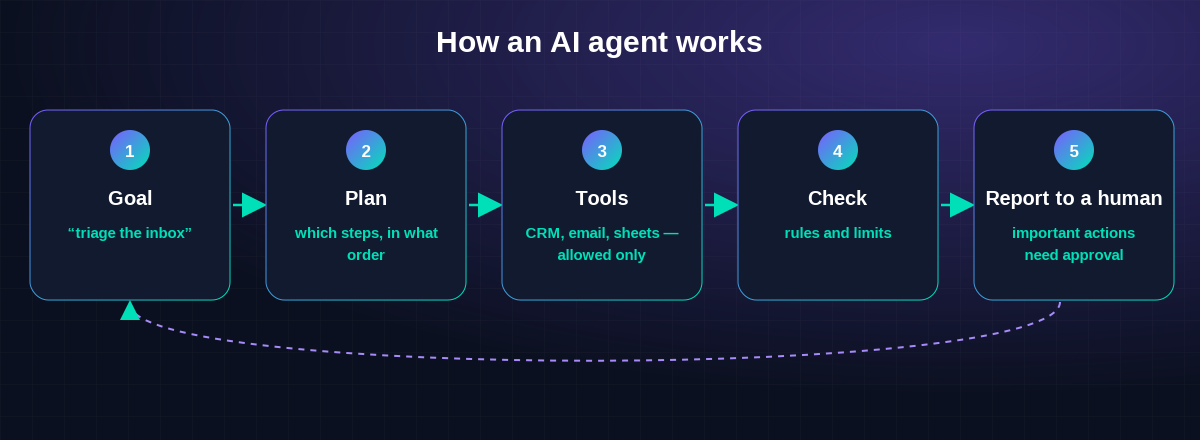
A chatbot answers questions. An agent takes steps toward a goal — looking up data, updating the CRM, drafting emails and tasks — using tools you permit.
Is it risky to give an agent CRM and email access?
Without limits, yes. Use minimal permissions, an action allow-list, human approval for important steps and a full action log.
How much does an AI agent cost?
A single-task agent costs $800–1,500, an agent integrated with CRM and email $2,000–4,000, plus $20–200 a month in model usage.
Where should we start?
With one repetitive task in “agent drafts, human approves” mode for 2–4 weeks.
Let’s talk about your project
Describe the task in a couple of sentences — I reply within one business day. Free and no obligation.
Telegram Discuss a project