The same templates are in the open-source claude-code-kit repository on GitHub.
Why CLAUDE.md matters
Every Claude Code session starts fresh: the model doesn’t remember that yesterday you agreed to run tests with pnpm. CLAUDE.md fixes that — write the essentials once and Claude gets them in context on every launch.
settings.json.Where the files live and how they load
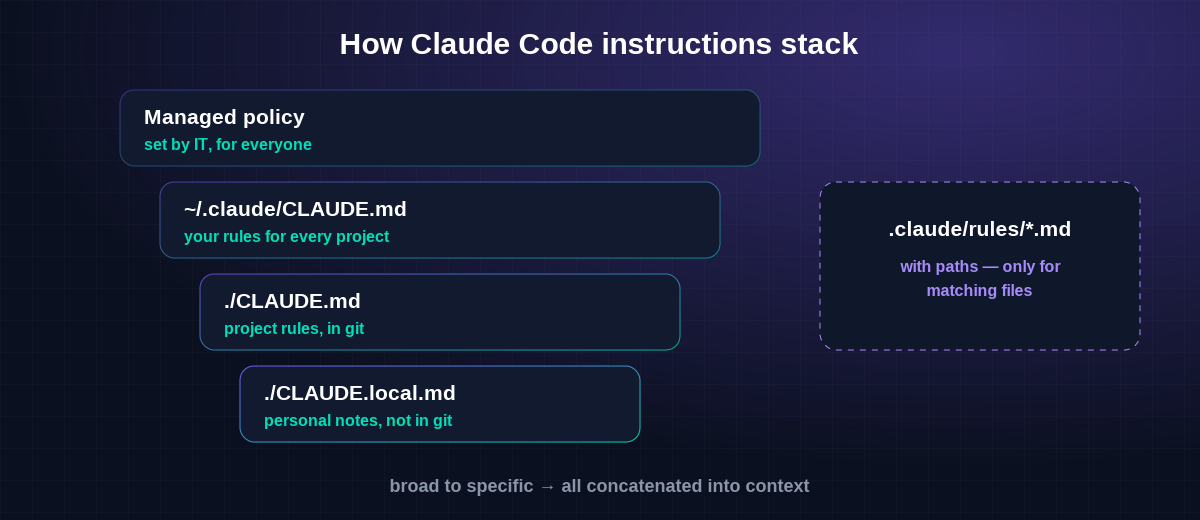
| Scope | Location | Use for |
|---|---|---|
| Managed policy | system-wide Claude Code folder (set by IT) | organization-wide rules |
| User | ~/.claude/CLAUDE.md | your preferences across all projects |
| Project | ./CLAUDE.md or ./.claude/CLAUDE.md | team instructions, committed to git |
| Local | ./CLAUDE.local.md | your personal project notes; add to .gitignore |
All discovered files are concatenated; more specific ones come later.
How Claude discovers CLAUDE.md files
- Up the tree, at launch: CLAUDE.md files in the working directory and every parent directory.
- Down the tree, on demand: files in subdirectories load when Claude reads or edits files there — handy in monorepos.
- Check what’s loaded with
/memory.
What to put in CLAUDE.md
- Commands: install, run, test, lint — exactly as you run them.
- Architecture: where things live and where new code goes.
- Conventions: style, naming, preferred libraries.
- Don’ts: files not to touch, actions that need a question first.
- Pointers to detailed docs via imports.
# Project: shop — Next.js + PostgreSQL

## Commands
- Dev: `npm run dev`
- Tests: `npm test` — run the related test after every change
- Must pass before finishing: `npm run lint && npm run typecheck`

## Don't
- Don't edit .env* or package-lock.json
- Don't add dependencies without asking
Writing instructions Claude follows
- Under 200 lines per file — longer files consume context and reduce adherence.
- Specific and verifiable: “use 2-space indentation”, not “format code properly”.
- Structured: Markdown headings and short bullets.
- Consistent: if two rules conflict, Claude may pick either one.
- Notes for humans go in block HTML comments
<!-- ... -->, which are stripped before reaching the model.
Imports with @
CLAUDE.md can pull in other files: @docs/api-conventions.md. Paths resolve relative to the importing file, and imports can nest up to four hops. Imports inside code blocks and `code spans` are ignored.
Path-scoped rules in .claude/rules
A rule without frontmatter loads at launch. A rule with paths loads only when Claude works on matching files:
---
paths:
  - "app/api/**/*.ts"
---
# API route rules
- Validate request bodies with zod, return 400 on failure
paths is the only field Claude Code reads from a rule; it accepts a list or a comma-separated string and supports patterns like src/**/*.{ts,tsx}. Personal rules for all projects go in ~/.claude/rules/.
CLAUDE.local.md, /init and /memory
CLAUDE.local.md— personal project notes, loaded after CLAUDE.md in the same folder; keep it out of git./initgenerates a starter CLAUDE.md, or suggests improvements if one exists. Always edit the result./memorylists all memory files, opens them for editing and manages auto memory.
Auto memory
Claude Code also keeps its own notes about the project and your preferences in ~/.claude/projects/<project>/memory/, with MEMORY.md as the index. The first 200 lines or 25 KB of the index load at session start; topic files load on demand. Turn it off in /memory or with "autoMemoryEnabled": false in project settings.
Monorepos: excluding other teams’ files
Use the claudeMdExcludes setting — an array of path globs, for example in .claude/settings.local.json — to skip CLAUDE.md files you don’t need. Managed policy files can’t be excluded.
Checklist
- Run, test and lint commands are present and work.
- There’s a map of the project.
- Rules are specific and consistent.
- Under 200 lines; details live in path-scoped rules.
- Hard limits are enforced with hooks or permissions.
- Personal notes live in
CLAUDE.local.md.
Related: install and safe setup, skills, subagents.
FAQ
Where should CLAUDE.md live?
Team instructions in the project root (./CLAUDE.md or ./.claude/CLAUDE.md), personal preferences in ~/.claude/CLAUDE.md, personal project notes in ./CLAUDE.local.md.
How long should CLAUDE.md be?
The docs recommend under 200 lines per file. Move details into .claude/rules/ with paths so they load only when needed.
Does CLAUDE.md guarantee Claude won’t do something?
No — it’s guidance. Enforce hard limits with hooks and permission rules in settings.json.
What’s the difference between CLAUDE.md and auto memory?
You write CLAUDE.md and commit it; Claude writes auto memory and keeps it locally under ~/.claude/projects/.../memory/.
Let’s talk about your project
Describe the task in a couple of sentences — I reply within one business day. Free and no obligation.
Telegram Discuss a project